

How it works
Most builders stop when it renders. We keep going.
Five stages sit between your sentence and a running app. The fourth is the one nobody else does: before it hands the app back, Vorx opens it, signs in, and clicks through it.
The pipeline
What happens after you press send
Every build and every edit goes through the same five stages. You see the last one; these are the other four.
- 01
Read the instruction
Your words are classified by what you are trying to achieve, not by which words you used. “Make it pop”, “add Stripe” and “this button is broken” are three different jobs, and they take three different routes through the builder.
No keyword matching anywhere in the path.
- 02
Design before code
A design pass runs first: the screens, the data model, and which existing files the change actually needs to touch. Deciding that up front is why an edit to one page doesn’t quietly rewrite the other nine.
Plan mode stops here and shows you the plan.
- 03
Build the whole thing
The UI, the data model, auth, the backend wiring, and seed data believable enough that the first screen has something in it. Migrations are worked out from the difference between the old data model and the new one, and are additive by default.
Not just the front end.
- 04
Check its own work
Vorx loads the app it just wrote, signs into it, and clicks through it. Anything that fails to render, fails to load, or throws on the way gets fixed and re-checked before the build is handed back to you.
The stage most builders skip.
- 05
Ship it, then keep going
Publish to a live URL. Then carry on chatting — every build is a checkpoint you can roll back to, so changing your mind costs you a click rather than a rebuild.
Most apps here are built over weeks, not minutes.
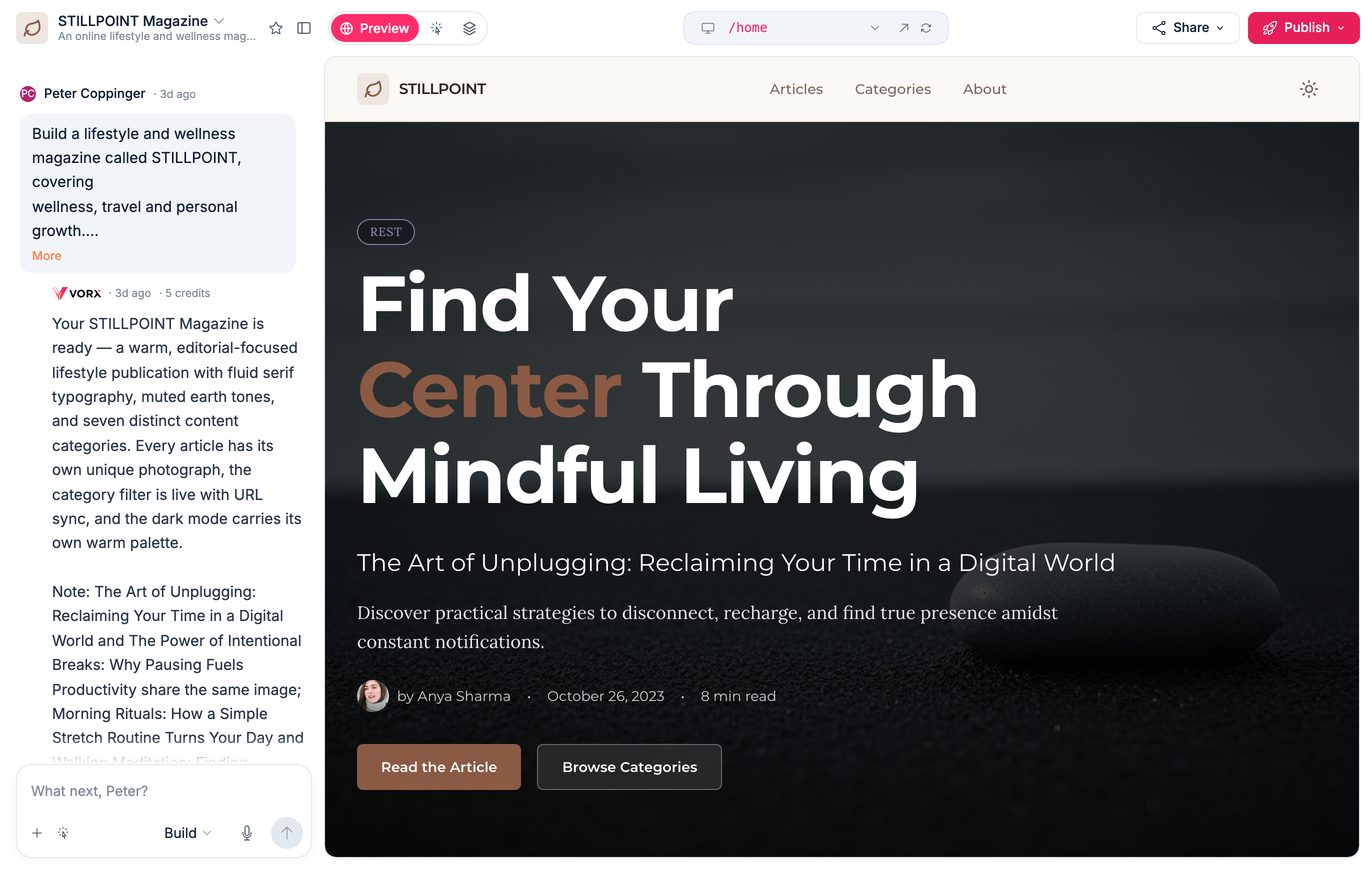
Chat on the left, your real app on the right — and what the build cost, in credits and minutes, under every reply.
The parts nobody wants to build
Auth, data, hosting. The unglamorous half of every app, done before you ask.
Publishing, handled
Every build gets a live URL the moment it's ready, and your own domain with certificates when you want one. No deploy pipeline to wrangle.
A real backend
Auth, database, APIs and hosting are generated alongside the UI, so what you build actually works when someone else opens it.
Three ways to change it
Chat for the big things, click an element to nudge it, or edit the code directly. They all write to the same project.
Design that ships
Shared tokens and drop-in components keep a growing app consistent, so page nine still looks like page one.
Rollback that means it
Every build is a checkpoint. Roll back to any of them without losing the conversation that got you there.
Own your code
Real, standard code with no proprietary runtime. Export the whole repo on any paid plan.
You see what it costs before it runs
Turn on cost preview and nothing is generated until you have seen what the edit will cost and which files it will touch. Cancel it and you have spent nothing.
How billing worksSee it build something
Describe an app in one sentence and watch a real one appear. No credit card, no setup.