

Account
Plans and credit usage
How Vorx credits work, what they pay for, how to check your balance, and how to get more when you need them.
Vorx uses one credit balance for everything that costs money to run: building and editing your apps in chat, and (as your apps grow) the backend and AI features those apps use in production.
Manage it all from Settings → Plans & credit usage — balance, plan, credit activity, and upgrades live in one place. For invoices, payment methods, and cancellation, see Plans and billing. For plan prices and feature comparisons, see pricing.
What is a credit?
A credit is the unit Vorx uses to measure and pay for usage across your workspace. One balance covers three kinds of work:
- Build — messages that plan, generate, edit, or update your app
- Cloud — hosting and running a deployed app’s built-in backend (database, storage, network, compute, realtime)
- AI in your app — model calls your deployed app makes (separate from the Vorx agent that helps you build)
Everyday tinkering — opening previews, reading code, and browsing your project — does not spend credits.
Where credits come from
Your workspace receives credits from a few sources. Vorx always spends the most specific grant first, then general credits that expire soonest.
Included with your plan
Every plan includes a monthly allotment of general credits:
- Free — 5 credits per day, up to 30 per month
- Pro — 100 credits per month (scale up with an add-on)
- Business — 100+ credits per month you can scale for the team
- Enterprise — volume pricing; talk to sales
Paid plans also refresh at the start of each billing period. On yearly billing you still get a monthly grant — you just pay for ten months and get twelve.
Extra monthly credits
On Pro and Business you can raise your monthly allotment without changing plan. Extra credits are a recurring add-on on the same subscription, billed with your plan. Scale up or down anytime; changes are prorated.
Signup, bonus, and top-up credits
- Signup credits — a one-time grant when you create a workspace (no card required on Free)
- Bonus credits — occasional grants for promotions, open-source, hackathons, and communities
- Top-up credits — one-time purchases on paid plans when you need more mid-cycle
How spend order works
- Usage-specific grants (for example daily build credits, when available) only cover their own usage type.
- General credits cover everything else, using the grant that expires soonest first so you lose as little as possible.
Unused monthly plan credits on paid plans roll over for two months while your subscription stays active. Credits bought as a top-up last 12 months. Daily Free credits do not roll over; they refill the next day instead.
What uses credits
Build costs
Credits are used when you work with Vorx in chat to plan, generate, or change an app.
Both composer modes are charged the same way: on the real model spend for that run, converted to credits at your plan's rate and rounded up to a whole credit, with a minimum of 1 credit per charged run.
- Plan mode — think through an idea, investigate a problem, or draft an approach without changing code. It doesn't generate anything, so it usually lands at the 1-credit minimum; a long investigation across a large project can cost more.
- Build mode — Vorx implements the change. Small tweaks tend to sit at or near the minimum; large generations, multi-file refactors, image work, and deep exploration cost more.
Because charges are whole credits with a floor of one, there's no such thing as a half-credit edit — the smallest possible charged run costs 1. That's worth knowing when you're deciding whether to split a change into several messages: five tiny prompts cost at least 5 credits, where one well-scoped prompt might cost 2.
Runs that never call a model are free — an undo or a rollback costs nothing at all.
Each reply in chat shows how many credits that turn used.
See Build and Plan modes for when to use each.
Cloud and in-app AI
The same balance is designed to cover what a live app consumes — hosting, database, storage, network, background compute, realtime traffic, and any AI calls your deployed app makes.
Today, only building is metered. Running a published app doesn't draw down your balance yet. When that changes we'll say so here and on the pricing page well before it takes effect.
Plans at a glance
- Free — try the full build loop with 5 credits a day, up to 30 a month, a vorx.live domain, and unlimited collaborators. No card required.
- Pro — 100+ monthly credits, rollover, top-ups, custom domains, remove the Vorx badge, email support.
- Business — everything in Pro, plus team workspace, roles, per-member credit limits, SSO, security center, and priority support.
- Enterprise — volume pricing, SCIM, audit logs, dedicated support, and custom connectors.
Full feature lists and prices live on the pricing page. You can also change plan or monthly credit level from Settings → Plans & credit usage.
Check your balance and activity
Open Settings → Plans & credit usage to see:
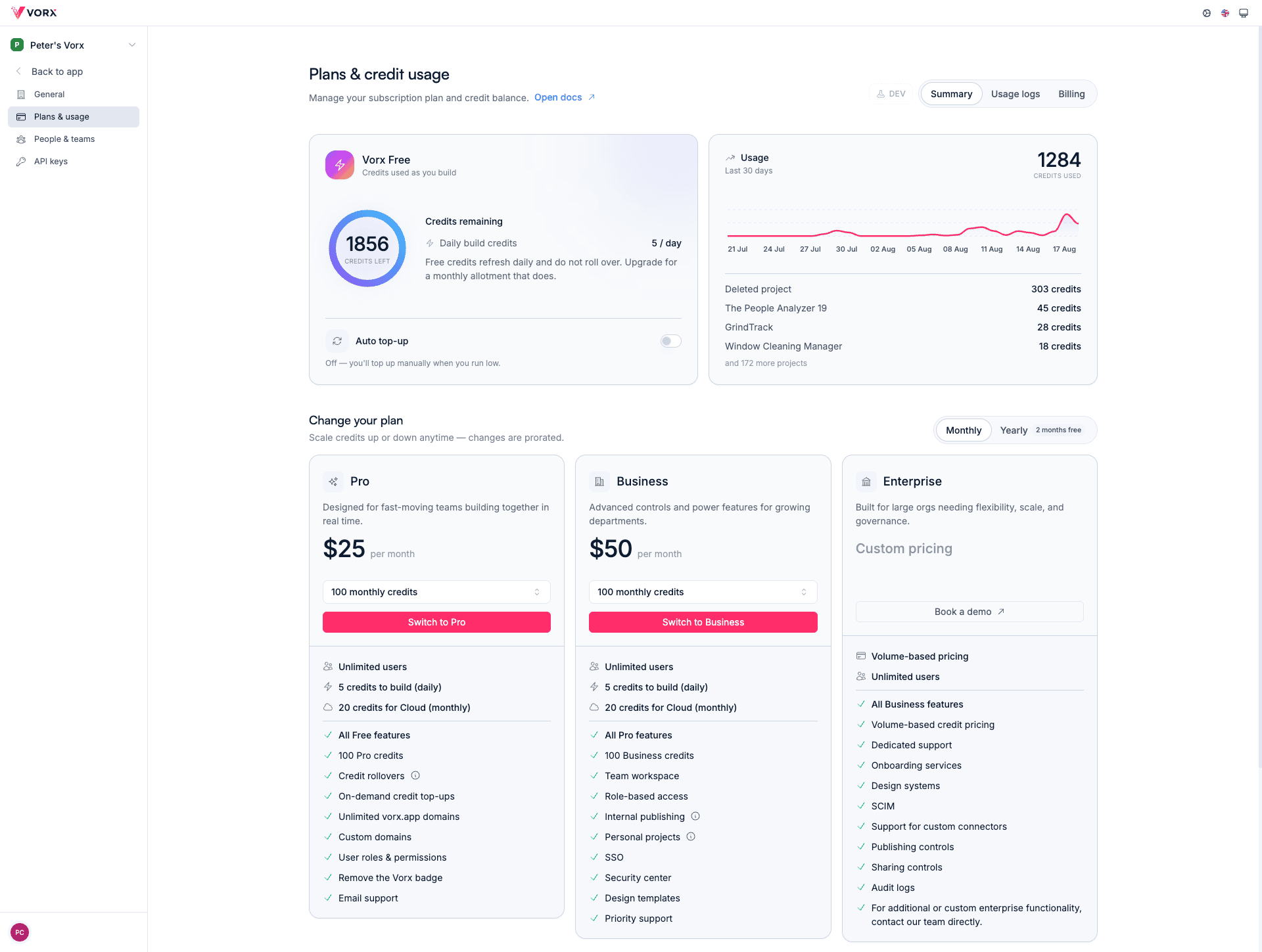
- Credits remaining and your monthly allotment (plan + any add-on)
- Credit activity — grants, purchases, and build deductions with dates and amounts
- Your current plan and options to upgrade, update credits, or manage billing
Positive activity rows are credits added; negative rows are spend or expiry. Admins manage the plan; everyone who builds can see that their runs cost credits in chat.
Get more credits
When you need more capacity:
- Raise monthly credits on Pro or Business — usually the best value if you build steadily.
- Upgrade the plan — unlock team features and a larger starting allotment.
- Buy a one-time top-up on paid plans for occasional spikes.
- Turn on auto top-up so the balance refills before you hit zero.
If you consistently burn through your allotment, raising the monthly add-on is cheaper than repeated top-ups. See Plans and billing for invoices and payment methods.
What happens when you run out
- Building stops. New chat builds and edits are blocked until credits are available again.
- Published sites stay up. Static pages keep serving.
- Backend and in-app AI that need credits may pause until the balance recovers.
On Free, upgrade or wait for tomorrow's credits. On paid plans, add credits, raise your monthly allotment, or enable auto top-up.
Tips to spend credits well
- Use Plan mode to scope a large change before Build mode does the expensive work.
- Prefer focused prompts — one clear ask costs less than a vague multi-feature request.
- Check the credits used line under each reply so you learn what expensive turns look like.
- On Business, set per-member credit limits so one person can’t burn the whole workspace balance — see Budget management.
- Review Credit activity weekly if you’re shipping hard — it’s the fastest way to spot runaway projects.
FAQ
Do credits expire? On paid plans, unused monthly credits roll over for two months while you stay subscribed. Top-up credits last 12 months, and bonus credits show their own expiry in activity when granted. Daily Free credits refill overnight rather than rolling over. Cancelling a paid plan expires remaining plan credits.
How is a Build turn priced? From the real model cost of that run, converted to credits at your plan's rate and rounded up to a whole credit, with a minimum of 1: $0.25 of model spend per credit on Free and Pro, $0.50 on Business. A Business credit covers more work, so the same change deducts fewer of them — the underlying dollar cost is the same either way, not cheaper.
Can I see which project used the most? Yes — credit activity and per-reply costs in chat show what each run spent. Workspace admins manage the overall balance from Plans & credit usage.
Who can change the plan or buy credits? Workspace owners and admins. Team members can build and see what their own runs cost.
Do I need a card to start? No. Free signup needs no card. You only add a payment method when you upgrade or buy top-ups.
Where do I cancel or download invoices? Settings → Plans & credit usage → Manage, or see Plans and billing.