Deploy to a custom domain
By The Vorx Team

When your app is ready for other people, publishing takes about a minute. Vorx handles the hosting, the certificate and the plumbing, so going live is a few clicks rather than a DevOps project.
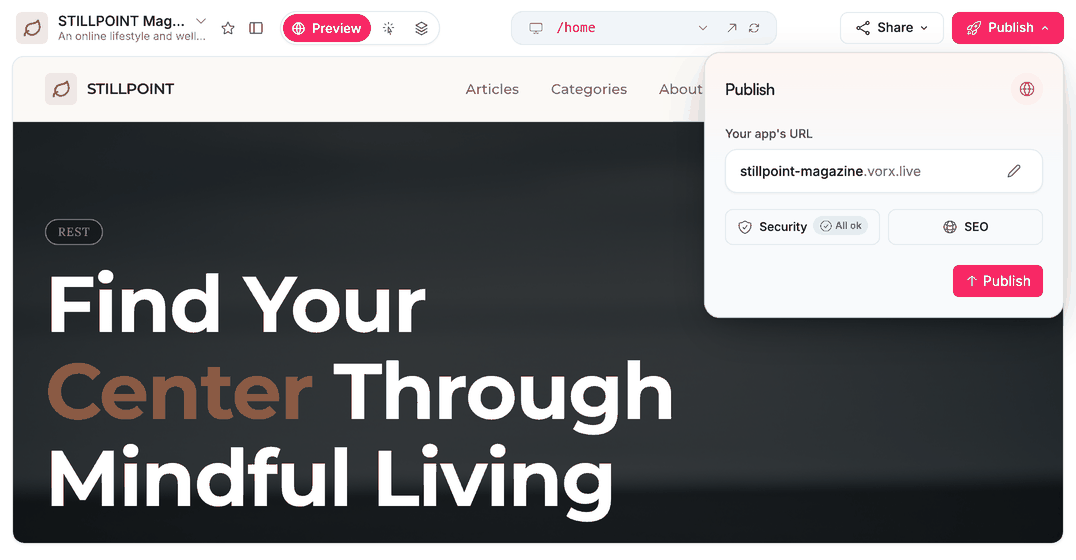
Publish
When the preview looks right, open the Publish dialog and go. Vorx builds your app for production and puts it on a live URL at your-app.vorx.live. The database, auth, storage and any backend functions go with it — you're not deploying the interface and wiring up the rest yourself.
The subdomain is yours to pick in the same dialog. Vorx suggests one from your project name and tells you whether it's available. You can change it later, though anyone holding the old link will need the new one.
Publishing your app doesn't make your project public. The app is public at its URL, which is the point; the project, its chat and its code stay private to your team.
Point your domain
When you want the app on your own address, open Publish → Connect domain and enter it. Vorx shows the exact DNS records to add at your registrar — the company where you bought the domain.
- Enter your domain, for example
app.yourcompany.com - Copy the records Vorx shows you — typically one for the address itself and one TXT record proving you own it
- Add them in your registrar's DNS settings
- Come back and click Verify
DNS changes take anywhere from a few minutes to a few hours to propagate. If your domain doesn't resolve straight away, give it time before assuming something is wrong.
A subdomain like app. or try. is usually the simplest place to start, since it leaves your main website untouched.
HTTPS is automatic
There's no certificate to buy or install. Once your domain points at Vorx, HTTPS is provisioned and renewed for you, so visitors always get a secure connection — and there's nothing to remember to renew a year from now.
Ship updates
Publishing isn't a one-way door. Keep iterating in chat, watch each change in the preview, and publish again whenever you're happy. Your live URL and custom domain stay the same across publishes, so sharing a link once is enough.
Your users stay on the current version until the new build finishes, so republishing in the middle of the working day doesn't show anyone a half-built app. A good rhythm is a small batch of changes, reviewed together, then a fresh publish.
Check the live one, not just the preview
After your first publish, open the real URL and run one core flow there. The published app has its own database — your preview's test records don't come with it — so this is where you find out whether the app works with nothing in it yet.
Worth confirming at the same time: any provider keys are the live ones rather than test ones, under Settings → Cloud → Secrets.
Own what you ship
Publishing on Vorx is the easy path, not the only one. Connect a repository under Settings → GitHub, take the code, and host it anywhere — there's no proprietary runtime holding the app in place.
With your app live, it's worth revisiting authentication if you haven't already, so a public URL is protected the way you intend.
In the docs: Deploying your app and Custom domains.