

Ship
Deploying your app
Publish your app to a live URL in one click — HTTPS, hosting, and the backend handled for you.
When your app is ready, publishing takes about a minute. Deploying gives you a real, shareable URL with everything wired up.
Publish
Open the Publish dialog and go. Vorx builds your app for production and puts it on a live URL at your-app.vorx.live. The database, auth, storage, and any backend functions are deployed along with the UI.
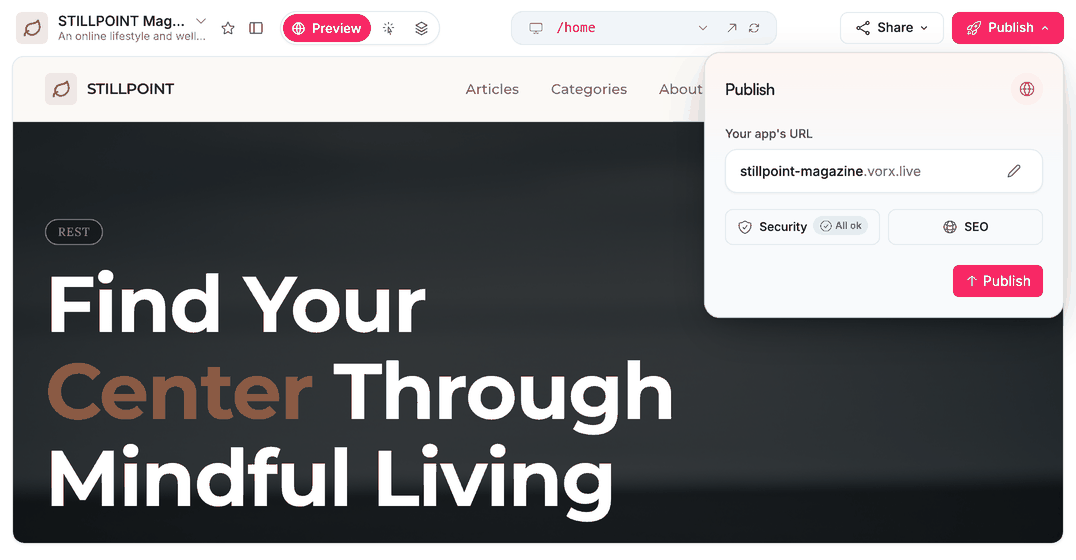
Choose your address
The .vorx.live subdomain is yours to pick in the same dialog — Vorx suggests one from your project name and tells you whether it's available. You can change it later, though anyone holding the old link will need the new one.
Ship updates
Keep iterating in chat and publish again whenever you want. Builds are fast, so publishing often is normal. Your users stay on the last published version until the new one finishes, so a republish doesn't show them a half-built app.
Your own domain
Put the app on an address you own, with automatic HTTPS. Connect it from the same Publish dialog — see Custom domains.
What publishing doesn't do
- It doesn't copy your preview's test records into a fresh database — see Environments.
- It doesn't swap a provider's test key for a live one. Check Settings → Cloud → Secrets first.
- It doesn't make your project public. The app is public at its URL; the project, chat and code stay private to your team.
Unpublish
Publish → Unpublish takes the app offline. What actually happens:
- The live URL stops resolving right away, and the published build is removed from our edge. Your free
your-app.vorx.liveaddress is released — you (or anyone) can claim it again later, so republishing may mean re-choosing it if someone else got there first. - A custom domain stays yours: its DNS stays connected, and your next publish points it back at the app automatically.
- Nothing happens to your data. The database, auth users, uploads and your project itself are untouched — the preview keeps working and you can keep editing.
- Republishing rebuilds from scratch, exactly like a first publish. Deployment history from before the unpublish can't be rolled back to, because those builds were removed.
Before the first one
Run the launch checklist — five minutes that catches most of what people otherwise fix in public.
Taking it elsewhere
Prefer to host it yourself? Connect a repository under Settings → GitHub, take the code, and deploy anywhere — nothing about Vorx locks the app to our hosting.
Next steps
- Custom domains — your own address
- Launch checklist — the pass before you publish
- Analytics — seeing who arrives