Invite your team and build together
By The Vorx Team

Building an app is rarely a solo effort. In Vorx you can bring teammates into the workspace to help shape an app, review the preview, and use the finished product — and the people who will actually use the thing give the best feedback while it's still cheap to change.
Invite people, and pick how much rope
Projects are private to your team by default. Sharing one offers two levels:
- Can edit — build and change the app in chat.
- Can view — open the project, click through it, leave comments, change nothing.
Invite someone by email when you know exactly who should have access. You can also generate an invite link, which carries whatever permission you set when you create it and can be switched off later. Because a link works for whoever holds it, keep links to Can view and reserve Can edit for people you name. For a team's shared work, opening the project to the whole workspace is usually simpler than naming people one at a time.
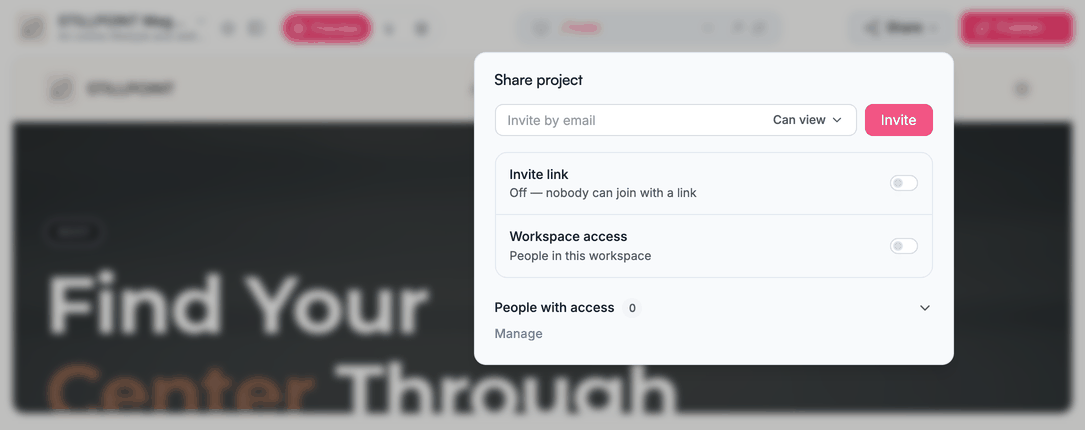
Collect feedback on the real thing
Share Can view and your reviewer gets the working app, not a screenshot. They click through it, hit the same dead ends your users would, and leave comments directly on the preview in comments mode.
That's the point of reviewing this way: feedback lands on the actual behaviour. "The date picker won't let me pick today" is a comment somebody can only make by trying it.
Build together on one app
When your team works on an app, you're all working against the same project. A productive session usually has one person driving chat and another clicking through the preview calling out what's off, refining screen by screen.
Let one person drive chat at a time. Requests stay clear, each change is confirmed against the same preview before the next one goes in, and nobody is surprised by an edit they didn't see coming. If a change lands badly, rolling back is free — so the cost of trying someone's idea is close to zero.
Realtime in the apps you build
VorxSync is the sync layer we're building, and once it ships it'll shape how the finished app behaves for your users, not just how you build it: writes hitting a local store first so the interface never waits on the network, changes streaming between users in realtime, and the app working offline and syncing when the connection returns. It's on our roadmap rather than in the apps you build today — a colleague sees another's change on their next request rather than live.
Share the finished app
When the app is ready, publish it. A published app is public at its URL — that's the point — while the project, its chat and its code stay private to your team regardless. Publishing shows people your app, never how it was built.
If you need changes later, anyone with edit access re-enters the loop, requests the change in chat, and publishes again. The URL stays the same, so people always land on the current version.
Who administers what
Access to a single project is a per-project setting. Who can manage members and billing is a workspace-level one — a distinction worth getting right before you invite a crowd.
Tips for team building
- Invite early. Feedback is cheapest while the app is still taking shape.
- Share view links, not edit links. It's the difference between a reviewer and a co-author.
- React to the preview together. Concrete beats abstract every time.
- Publish after meaningful changes so everyone is looking at the same version.
Ready to build with your team? Read the build loop for the core workflow, then create an account.
In the docs: Collaboration and Sharing and permissions.